Graphics: MATLAB plots with LaTeX-formatted labels
Creating plots in MATLAB using LaTeX for axis labels, titles, and legends.
For graphic designers, creating visuals is natural, whereas for people working with computation and modelling, it is a separate challenge.
I approach this through coding:
- plots are created in MATLAB and Python (Matplotlib),
- the LaTeX interpreter is used to keep text formatting consistent with the document,
- drawings are created in TikZ (a LaTeX package for electrical and block diagrams).
This approach provides high-quality graphics with mathematical notation and a script-based workflow.
In this post, I show a minimal MATLAB example that includes all key elements in a single figure. Examples in Python and TikZ will be covered separately.
Somewhat more advanced figures include multi-panel layouts (using subplot function), inset plots, dual axes (left and right Y-axes), and more advanced formatting. These will be described in separate posts.
Damped oscillatory waveform in MATLAB
Below is an example plot exported as a PNG image for use in a document.
The plotted function is:
\[i(t)=I_\mathrm{m}\cos(\omega t)\,\mathrm{e}^{-t/\tau},\]where: $I_\mathrm{m} = 1$ – peak amplitude [p.u.],
$f = 50$ – frequency [Hz],
$\omega = 2\pi f$ – angular frequency [rad/s],
$\tau = 0.05$ – time constant [s].
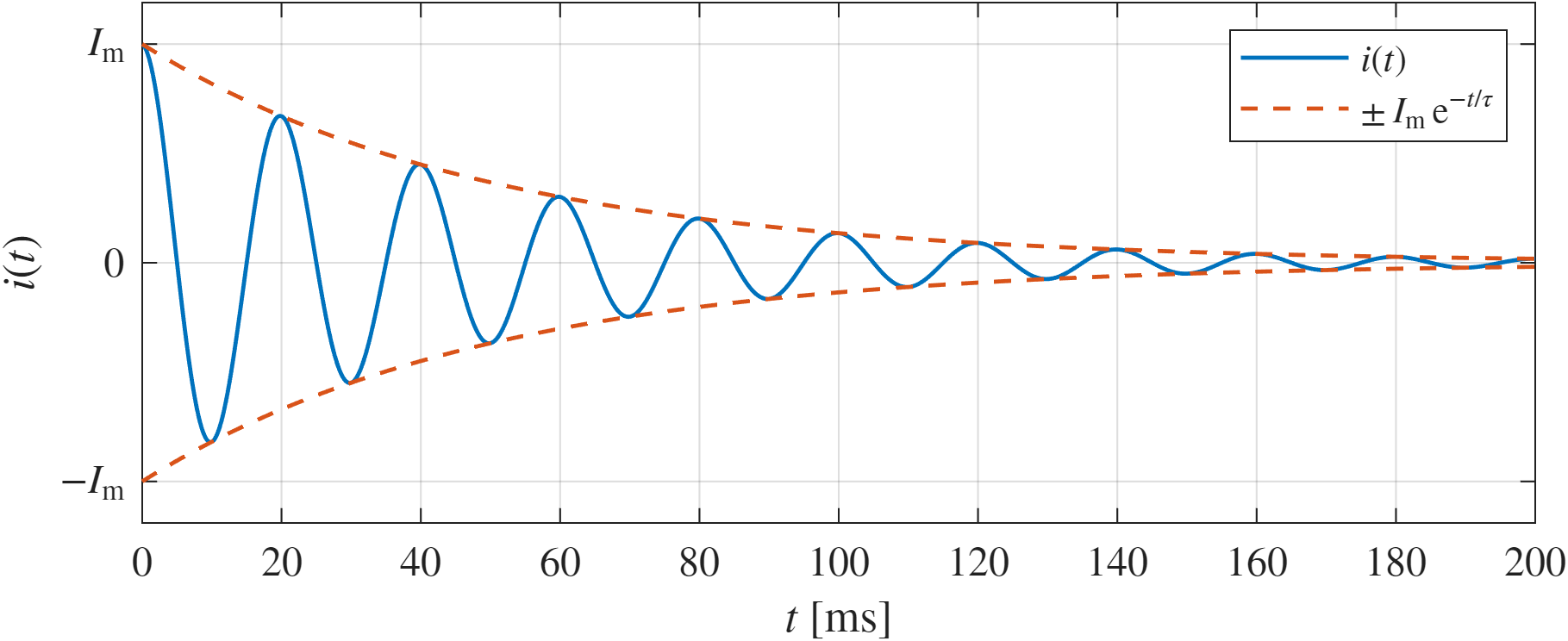 Fig. 1. Damped oscillatory waveform.
Files used in this example:
MATLAB code
An example including the key elements: waveform, envelope, axis labels, and legend.
Key setting: LaTeX interpreter as default for all text elements.
The description is provided directly in code comments.
1
2
3
4
5
6
7
8
9
10
11
12
13
14
15
16
17
18
19
20
21
22
23
24
25
26
27
28
29
30
31
32
33
34
35
36
37
38
39
40
41
42
43
44
45
46
47
48
49
50
51
52
53
54
55
56
57
58
59
60
61
62
63
64
65
66
67
68
69
70
71
72
73
74
75
76
%% MATLAB settings
clc; clear; format compact;

%% Graphics settings
% Use LaTeX for axis labels, text, and legend
set(groot, ...
    'defaultAxesTickLabelInterpreter','latex', ...
    'defaultTextInterpreter','latex', ...
    'defaultLegendInterpreter','latex');

% Global graphics defaults for consistent appearance
set(groot, ...
    'defaultLineLineWidth',1.15, ...
    'defaultAxesFontSize',12, ...
    'defaultTextFontSize',12);

% Figure size: [left, bottom, width, height] in points
set(gcf, 'Units', 'points', 'Position', [200,150,500,200]);

%% Signal parameters
% Cosine current with exponentially decaying amplitude
Im  = 1;          % peak current amplitude
f   = 50;         % frequency [Hz]
w   = 2*pi*f;     % angular frequency [rad/s]
tau = 0.05;       % time constant [s]

%% Time vector and waveform definition
% Signal computed over 1 s
t = 0:1e-4:1;

% Damped oscillatory current waveform
i = Im*cos(w*t).*exp(-t/tau);

% Positive exponential envelope
envelope = Im*exp(-t/tau);

%% Plot
% Color definitions
blueColor = [0.0000 0.4470 0.7410];
redColor  = [0.8500 0.3250 0.0980];

% Plot with handles
hp1 = plot(t, i, 'Color', blueColor); hold on; grid on;
hp2 = plot(t, envelope, '--', t, -envelope, '--');
set(hp2, 'Color', redColor);
hold off;

%% Axes limits
xlim([0 200]*1e-3); % Only initial transient part is displayed, 0-200 ms
ylim(1.19*[-1 1]);  % Approximately 1.2

%% Axis ticks and labels
% Time axis in milliseconds for easier interpretation
xtick_values = 0:20e-3:200e-3;
xticks(xtick_values);
xticklabels(num2str(xtick_values'*1e3));
xlabel('$t\:[\mathrm{ms}]$');

% Y-axis normalized to peak current Im
yticks([-1 0 1]);
yticklabels({'$-I_\mathrm{m}$','0','$I_\mathrm{m}$'});
ylabel('$i(t)$');

%% Title and legend
title('$i(t)=I_\mathrm{m}\cos(\omega t)\,\mathrm{e}^{-t/\tau}$');

legend([hp1 hp2(1)], ...
    {'$i(t)$', '$\pm\,I_\mathrm{m}\,\mathrm{e}^{-t/\tau}$'}, ...
    'Location','northeast');

%% Export figure
% PDF (vector graphics) – suitable for LaTeX documents
exportgraphics(gcf, 'current_oscillatory_waveform.pdf');

% PNG (raster graphics) – suitable for web use
exportgraphics(gcf, 'current_oscillatory_waveform.png', 'Resolution', 300);
Default MATLAB color palette (RGB)
The file with the default MATLAB color palette is available here (it is useful to have it at hand when creating plots).
Code snippet:
1
2
3
4
5
6
7
8
9
10
%% MATLAB default color order (RGB)
% Order matches MATLAB default axes ColorOrder

blueColor       = [0.0000 0.4470 0.7410]; % blue
redColor        = [0.8500 0.3250 0.0980]; % red
yellowColor     = [0.9290 0.6940 0.1250]; % yellow
purpleColor     = [0.4940 0.1840 0.5560]; % purple
greenColor      = [0.4660 0.6740 0.1880]; % green
lightBlueColor  = [0.3010 0.7450 0.9330]; % light blue
darkRedColor    = [0.6350 0.0780 0.1840]; % dark red
These colors are used by MATLAB by default for successive data series.
Example plot:
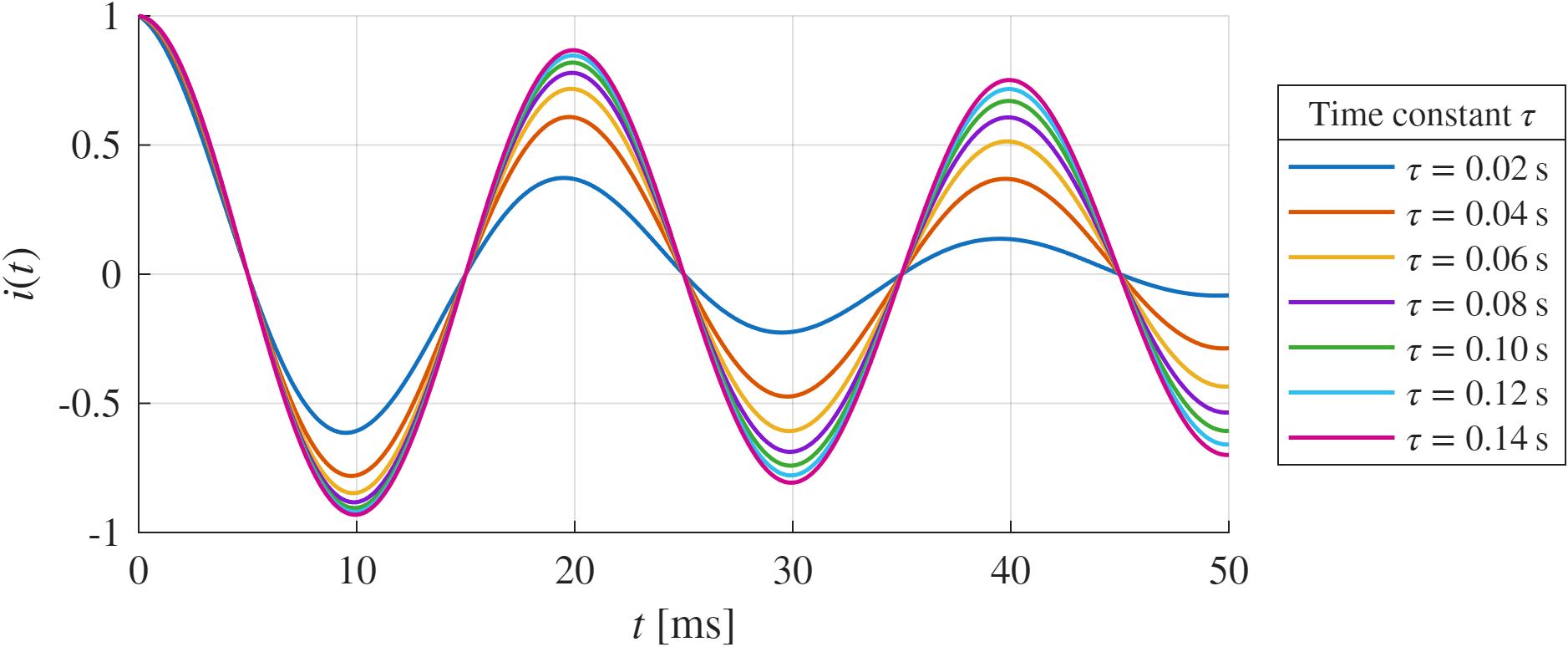 Fig. 2. Damped oscillatory waveforms for different time constants.
Notes
- The LaTeX interpreter in MATLAB supports only a subset of LaTeX.
- It is useful to export plots to PDF (vector) in addition to PNG.
Summary
A script-based approach provides reproducible and high-quality plots.
Code → plot → have fun.