Jekyll Blog: Blog statistics in Chirpy theme – Liquid
Adding a blog statistics panel in the Chirpy theme: number of posts, categories, tags and total reading time generated statically by Jekyll using Liquid.
At the final stage of building a blog, a question appears: what else could be added?
It is good not to add too much. Just enough.
I decided to add a statistics panel in the right column of the blog:
- number of posts,
- number of categories,
- number of tags,
- total reading time of all posts.
The final result looks like this:
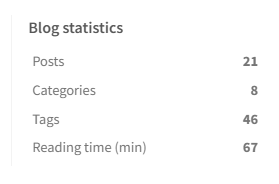 Fig. 1. Blog statistics.
Additionally, in one of the posts I added a dynamic line:
1
This blog already has **{{ count }} {{ suffix }}**.
It is displayed as: This blog already has 28 posts.
Where and what code to add
File:
1
_includes/update-list.html
The code should be inserted above the <section id="access-lastmod"> section:
1
2
3
4
5
6
7
8
9
10
11
12
13
14
15
16
17
18
19
20
21
22
23
24
25
26
27
28
29
30
31
32
33
34
35
36
37
  <!-- MPS: Blog stats panel -->
  <section id="access-stats">
    <h2 class="panel-heading">Blog Statistics</h2>

    {% assign posts_count = site.posts | size %}
    {% assign tags_count = site.tags | size %}
    {% assign categories_count = site.categories | size %}

    {% assign total_words = 0 %}
    {% for post in site.posts %}
      {% assign words = post.content | number_of_words %}
      {% assign total_words = total_words | plus: words %}
    {% endfor %}
    {% assign total_minutes = total_words | divided_by: 200 %}

    <ul class="content list-unstyled ps-0 pb-1 ms-1 mt-2">
      <li class="lh-lg d-flex justify-content-between">
        <span>Posts</span>
        <span><strong>{{ posts_count }}</strong></span>
      </li>

      <li class="lh-lg d-flex justify-content-between">
        <span>Categories</span>
        <span><strong>{{ categories_count }}</strong></span>
      </li>

      <li class="lh-lg d-flex justify-content-between">
        <span>Tags</span>
        <span><strong>{{ tags_count }}</strong></span>
      </li>

      <li class="lh-lg d-flex justify-content-between">
        <span>Reading time (min)</span>
        <span><strong>{{ total_minutes }}</strong></span>
      </li>
    </ul>
  </section>
The total reading time is calculated based on the total number of words in all posts (number_of_words) with an assumed average reading speed of 200 words per minute (Liquid: {% assign total_minutes = total_words | divided_by: 200 %}).
Language versions can be implemented either by using data from, e.g., data/locales/pl.yml and data/locales/en.yml, or, more simply (as in my case), by hardcoding these few labels directly in the _includes/update-list.html files of the respective repositories (blog-pl and blog-en).
Technical details
This solution is fully static, so it does not affect the loading speed of the page in the browser:
- calculations are performed by Liquid during the build (
jekyll serveor GitHub Pages), - the result is written into the generated HTML as plain text,
- the user receives a static page.
For me, this is one of the greatest advantages of Jekyll: everything is generated statically.
There are no database queries (e.g. MySQL), no dynamic calculations on the user side (although JavaScript plugins can be added if needed).
How does this affect the Jekyll build time?
The panel is generated during the build process by executing Liquid code ({% ... %}), so the blog remains fully static and its performance is not affected.
Summary
The solution is simple, clean and fully aligned with the philosophy of static site generators.
It is simple. And that is what makes it great.