Jekyll Blog: Sidebar Footer in the Chirpy Theme – CSS
How to add a custom footer to the sidebar in the Chirpy theme.
Jekyll Blog: Sidebar Footer in the Chirpy Theme – CSS
I liked the element at the bottom of the sidebar in the Flexible Jekyll theme, so I implemented it in my Chirpy theme.
It required a modification of _includes/sidebar.html and adding a few custom classes and CSS rules to assets/css/custom.css.
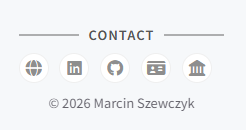 Fig. 1. Sidebar footer.
The sidebar footer consists of three elements:
- A CONTACT title with decorative lines on both sides
- Existing social icons (without modifying the theme logic)
- A copyright notice below the icons
Modifying _includes/sidebar.html
The title is inserted before the icons block, and the copyright is added inside .sidebar-bottom (below the icons loop).
1
2
3
4
5
6
7
8
9
10
11
12
13
14
15
16
17
18
19
20
21
22
23
24
25
26
27
28
29
30
31
32
33
  <!-- MPS: CONTACT title -->
  <div class="mps-sidebar-contact-title w-100">
    <span class="line"></span>
    <span class="text">CONTACT</span>
    <span class="line"></span>
  </div>

  <!-- MPS: Chirpy icons (unchanged, CONTACT copyright added) -->
  <!-- replace:
      <div class="sidebar-bottom d-flex flex-wrap align-items-center w-100">
      with:
      <div class="sidebar-bottom mps-contact-bottom d-flex flex-wrap align-items-center w-100">
  -->
 <div class="sidebar-bottom mps-contact-bottom d-flex flex-wrap align-items-center w-100">


    <!-- original theme loop without changes -->

    <!-- original theme loop without changes -->

    <!-- original theme loop without changes -->

    <!-- original theme loop without changes -->

    <!-- original theme loop without changes -->


    <!-- MPS: CONTACT copyright -->
    <div class="mps-sidebar-contact-copyright">
      © 2026 Marcin Szewczyk
    </div>

</div>
Adding CSS to assets/css/custom.css
The following is appended at the end of the file:
1
2
3
4
5
6
7
8
9
10
11
12
13
14
15
16
17
18
19
20
21
22
23
24
25
26
27
28
29
30
31
32
33
34
35
36
37
38
39
40
41
42
43
44
/* ==========================================================================
   MPS: Sidebar – CONTACT (title + icons + copyright)
   ========================================================================== */

/* Title */
#sidebar .mps-sidebar-contact-title {
  display: flex;
  align-items: center;
  justify-content: center;
  gap: 0.6rem;
  margin-bottom: 0.5rem;
  font-weight: 600;
  letter-spacing: 0.08em;
  text-transform: uppercase;
  font-size: 0.9rem;
  color: var(--sidebar-muted-color);
}

/* Title decorative lines */
#sidebar .mps-sidebar-contact-title .line {
  flex: 1;
  height: 2px;
  background: currentColor;
  opacity: 0.45;
  max-width: 60px;
}

/* Center this specific sidebar-bottom block */
#sidebar .mps-contact-bottom {
  justify-content: center !important;
  padding-left: 0 !important;
  padding-right: 0 !important;
}

/* Copyright in this block */
#sidebar .mps-contact-bottom .mps-sidebar-contact-copyright {
  flex: 0 0 100% !important;
  width: 100% !important;
  text-align: center !important;
  margin-top: 0.2rem;
  font-size: 0.9rem;
  opacity: 0.75;
  color: var(--sidebar-muted-color);
}
A simple naming convention is applied: all custom classes in custom.css start with mps-. This minimizes the risk of conflicts with future theme updates.
Summary
Simple → works → looks good.
© Marcin Szewczyk. All rights reserved.