Jekyll Blog: How to Write Blog Posts – Markdown "Hello World"
How to create posts in Jekyll: Markdown file structure, front matter (YAML), \_posts directory convention, asset organization, and basic elements of formatting, code, and graphics.
Jekyll has several nice features. The first one: the blog is static and built from posts written in Markdown. Below is a simple “Hello World” example – a few elements that I use most often.
The blog content is generated by Jekyll as a static site and served by GitHub. What I edit are plain text files in Markdown, with simple syntax. Below are the basic elements I use: headings, lists, code, and links. This is enough to write and publish a post. In addition, there is metadata: title, date, category, and tags.
Jekyll ensures that posts appear only when their date arrives. This makes it easy to schedule publications in a controlled rhythm.
Posts are stored locally in the _posts directory, with a very convenient filename format: date yyyy-mm-dd, then the name, and the .md extension. Example: 2026-02-07-jekyll-markdown-hello-world.md.
When I add new .md files to the local _posts directory, they are immediately visible locally at 127.0.0.1:4000, and on the live blog after commit and push.
So the workflow is simple: create a .md file, save it locally in _posts, commit and push – the post goes to the repository and appears according to its date.
“Hello World” Post in Markdown
Metadata (front matter / head)
At the beginning there is front matter (header) containing metadata recognized by Jekyll.
1
2
3
4
5
6
7
---                                      # Start of front matter
title: "Hello-world markdown for Jekyll" # Displayed as page heading
description: "Example of Jekyll front matter (YAML) structure with basic metadata fields."
date: 2026-02-06 08:00:00 +0100          # Publication date and time; used by Jekyll for sorting and publishing
categories: [Blog]                       # Post category (or list of categories)
tags: [blog, jekyll]                     # List of tags for classification and filtering
---                                      # End of front matter
Directory Structure Convention
Posts are placed in the Jekyll “special” directory _posts. The filename example: 2026-02-07-jekyll-markdown-hello-world.md.
All materials related to a given post are stored in a separate directory:
1
2
3
4
5
6
7
assets/
└── posts/
    └── jekyll-markdown-hello-world/
        ├── cauchy.png
        ├── plot.svg
        ├── data.csv
        └── cauchy.pdf
This directory contains all files related to the post: images, PDFs, auxiliary data, etc.
In the post content, I reference them by path :
1
[Caption](/assets/posts/jekyll-markdown-hello-world/cauchy.png)
Post Content (content / body)
The content begins directly after the metadata.
Text is plain text, e.g.: “I created a blog, so the question arose what to write so that the blog has at least one post.”
Text formatting: bold, italic, bold and italic, bold and italic.
1
2
Text formatting: **bold**, *italic*,
***bold and italic***, ***bold** and italic*.
Links
A link like this: https://marcinszewczyk.net/
1
[link text](https://marcinszewczyk.net/)
Headings
They are used for table of contents, anchors, and SEO (Search Engine Optimization):
1
2
3
# Level 1 heading
## Level 2 heading
### Level 3 heading
Figures
Example figure:
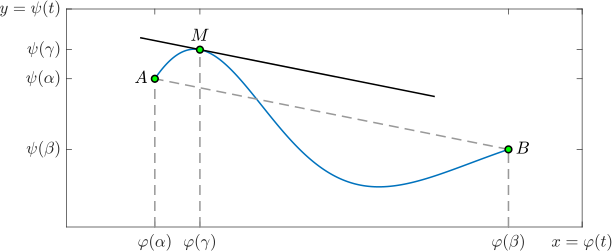 Fig. 1. Geometric interpretation of Cauchy’s theorem.
Code:
1
2
3
<!-- note: no blank line between the image and the caption -->

***Fig. 1.** Geometric interpretation of Cauchy’s theorem.*
Linking to files: same as above, just without “!”.
Lists
Unordered list:
- list item
- text – bold
text– inline code
1
2
3
- list item
- **text** -- bold
- `text` -- inline code
Ordered list:
- list item
- text – bold
text– inline code
code
1
2
3
1. list item
2. **text** — bold
3. `text` — inline code
Code
Inline code:
1
`inline code`
Code blocks.
Bash:
1
2
3
```bash
git clone https://github.com/...
```
Result:
1
git clone https://github.com/...
Markdown:
1
2
3
4
```markdown
title: "Hello-world markdown for Jekyll"
...
```
Result:
1
2
title: "Hello-world markdown for Jekyll"
...
Python:
1
2
3
4
```python
print("Hello, world!")
...
```
Result:
1
2
print("Hello, world!")
...
C:
1
2
3
4
5
6
#include <stdio.h>

int main(void) {
    printf("Hello, world!\n");
    return 0;
}
LaTeX:
1
2
3
4
5
6
7
\documentclass{article}

\begin{document}

Hello, world!

\end{document}