LaTeX: Hello World – a (Nearly) Minimal Example
A LaTeX 'Hello World' in two variants: a minimal file and a practical template with preamble, packages, sections, math, a figure and bibliography, plus the basics of compiling to PDF.
LaTeX documents are text files that describe structure and typographic layout using commands and environments. It is compiled into output formats such as PDF. The file is created in any text editor and then compiled using a chosen TeX distribution, e.g. TeX Live. LaTeX is not a WYSIWYG (What You See Is What You Get) tool — the document is described textually, and its final form is produced only after compilation.
In larger projects, additional packages are included and the project structure is organized across multiple text files (chapters, bibliography, figures, macro definitions). To streamline the workflow, environments such as Overleaf, TeXstudio or VS Code (with appropriate extensions) are typically used.
I describe those environments in another post – here I present a Hello World example in plain LaTeX. Besides the absolute minimum, I also show a practical variant containing some basic elements that I use in real work and that illustrate the LaTeX workflow more clearly.
Below is a preview of the PDF document generated from the hello-practical-en.tex file discussed in this post.
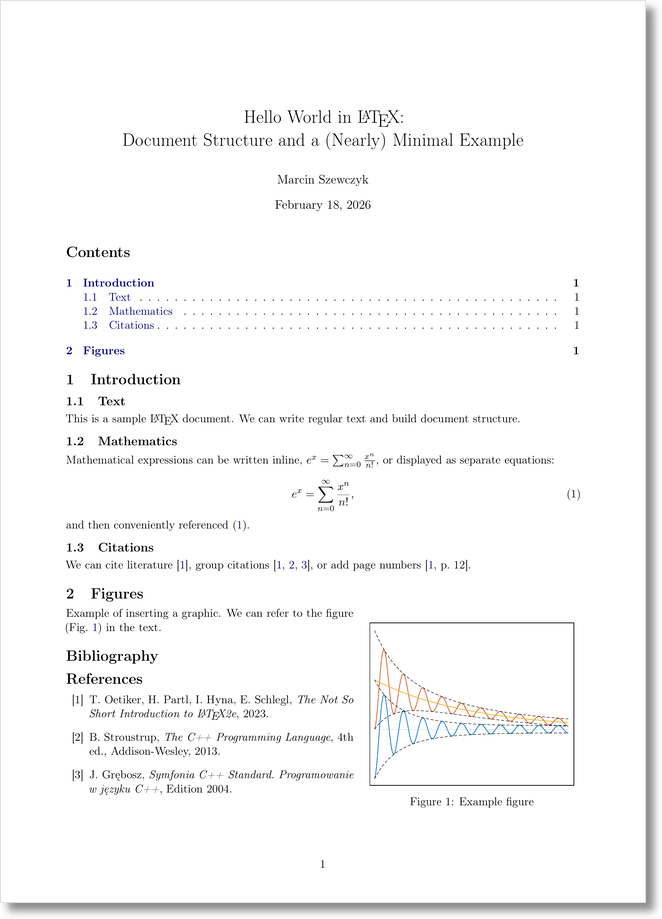 Rys. 1. Preview of the generated PDF
 hello-practical-en.pdf.
Document Structure
Like HTML, LaTeX is a markup language in which a document is described using typesetting commands. A .tex file is the source code that, after compilation, generates the final document (most commonly a PDF). In the case of HTML, a .html file is interpreted by the browser.
A LaTeX document is saved as a text file with the .tex extension, for example hello-minimal.tex.
Every LaTeX document has two fundamental parts:
- The preamble – everything before
\begin{document}...\end{document}\ - The document body – text and commands between
\begin{document}and\end{document}
The preamble defines:
- the document class (
\documentclass), - packages (
\usepackage), - custom macro definitions,
- global settings.
The document body contains:
- text,
- sections,
- formulas,
- figures,
- tables,
- other elements (bibliography, etc.).
LaTeX Command Syntax
LaTeX commands have the form:
1
\command[options]{arguments}
where:
\command— command name,[options]— optional arguments (in square brackets),{arguments}— mandatory arguments (in curly braces).
Examples:
\documentclass[a4paper,12pt]{article}– document classarticle, paper sizea4paper, font size12pt\section{Introduction}– first-level heading
Hello World Document – Minimal Example
The minimal document hello-minimal.tex (using the article class) looks as follows:
1
2
3
4
5
% Title: LaTeX Hello World minimal example
\documentclass{article}
\begin{document}
    Hello World
\end{document}
It can be compiled using a simple command in the terminal:
1
pdflatex hello-minimal.tex
Hello World Document – (Nearly) Minimal Example
In practice, additional elements are typically required:
- in the preamble:
- encoding and language settings,
- math packages,
- graphics support,
- metadata (title, author, date);
- in the document body:
- table of contents,
- section structure,
- bibliography.
A practical minimal example hello-practical-pl.tex then looks as follows:
1
2
3
4
5
6
7
8
9
10
11
12
13
14
15
16
17
18
19
20
21
22
23
24
25
26
27
28
29
30
31
32
33
34
35
36
37
38
39
40
41
42
43
44
45
46
47
48
49
50
51
52
53
54
55
56
57
58
59
60
61
62
63
64
65
66
67
68
69
70
71
72
73
74
75
76
77
78
79
80
81
82
83
84
85
86
87
88
89
90
91
92
93
94
95
96
97
98
99
100
101
102
103
104
105
106
107
108
% File: hello-practical-en.tex
% Author: Marcin Szewczyk
% Title: LaTeX Hello World practical example
% Created: 2026-02-20

\documentclass[a4paper,11pt]{article}

% --- Encoding & language ---
\usepackage[T1]{fontenc}
\usepackage[utf8]{inputenc}
\usepackage[english]{babel}

% --- Layout ---
\usepackage[left=18mm,right=18mm,top=18mm,bottom=18mm]{geometry}
\usepackage{microtype}

% --- Section spacing ---
\usepackage{titlesec}
\titlespacing*{\section}{0pt}{0.8\baselineskip}{0.3\baselineskip}
\titlespacing*{\subsection}{0pt}{0.6\baselineskip}{0.2\baselineskip}

% --- Math & graphics ---
\usepackage{amsmath}
\usepackage{graphicx}
\usepackage{wrapfig}

% --- Hyperlinks ---
\usepackage{xcolor}
\usepackage[
colorlinks=true,
linkcolor=blue!50!black,
urlcolor=blue!50!black,
citecolor=blue!50!black
]{hyperref}

% --- Frame settings ---
\setlength{\fboxsep}{4pt}
\setlength{\fboxrule}{0.6pt}

% --- Metadata ---
\title{Hello World in \LaTeX:\\
	Document Structure and a (Nearly) Minimal Example}
\author{Marcin Szewczyk}
\date{\today}

\begin{document}

	\maketitle
	\tableofcontents

	\section{Introduction}

	\subsection{Text}

	This is a sample \LaTeX\ document.
	We can write regular text and build document structure.

	\subsection{Mathematics}

	Mathematical expressions can be written inline,
	$ e^x=\sum_{n=0}^{\infty}{x^n\over n!} $,
	or displayed as separate equations:

	\begin{equation}\label{eq-ex}
		e^x=\sum_{n=0}^{\infty}{x^n\over n!},
	\end{equation}

	\noindent and then conveniently referenced~\eqref{eq-ex}.

	\subsection{Citations}

	We can cite literature \cite{oppenheim2023},
	group citations \cite{oppenheim2023,stroustrup2013,grebosz2004},
	or add page numbers \cite[p.~12]{oppenheim2023}.

	\section{Figures}

	\begin{wrapfigure}{r}{0.42\textwidth}
		\centering
		\fbox{\includegraphics[width=0.38\textwidth]{figures/mat-gcb.pdf}}
		\caption{Example figure}
		\label{fig:example}
	\end{wrapfigure}

	Example of inserting a graphic.
	We can refer to the figure (Fig.~\ref{fig:example}) in the text.

	\section*{Bibliography}

	\begin{thebibliography}{99}

		\bibitem{oppenheim2023}
		T.~Oetiker, H.~Partl, I.~Hyna, E.~Schlegl,
		\textit{The Not So Short Introduction to \LaTeX2e}, 2023.

		\bibitem{stroustrup2013}
		B.~Stroustrup,
		\textit{The C++ Programming Language},
		4th ed., Addison-Wesley, 2013.

		\bibitem{grebosz2004}
		J.~Grębosz,
		\textit{Symfonia C++ Standard. Programowanie w języku C++},
		Edition 2004.

	\end{thebibliography}

\end{document}
This is a starting point closer to real-world work than the formal syntactic minimum.
Files Used in This Example
Files used in this post:
hello-minimal.tex– minimal Hello World example\hello-practical-pl.tex– (nearly) minimal Hello World example in Polish (e.g. trailing dots after section numbers)\hello-practical-en.tex– (nearly) minimal Hello World example in English (e.g. no trailing dots after section numbers)
After compilation, a .pdf file is produced containing the final document.
During compilation, auxiliary files are generated automatically and are not intended for manual editing:
hello-practical.aux— auxiliary data (references, labels, citations)\hello-practical.log— compilation log\hello-practical.toc— table of contents data\hello-practical.out— PDF bookmark data (packagehyperref)\hello-practical.gz— compressed bookmark data (if compression is enabled)
For documents containing references, table(s) of contents, indexes, or citations, multiple compilation runs are required. The first pass writes auxiliary data (e.g. section numbers, labels, citations) to files such as .aux or .toc, and subsequent passes use that data to typeset the document correctly.
If the document is compiled within a GitHub repository, auxiliary files should be excluded from version control (their extensions added to .gitignore):
# LaTeX auxiliary files
*.aux
*.log
*.toc
*.out
*.gz
*.lof
*.lot
*.fls
*.fdb_latexmk
*.synctex.gz

# Bibliography
*.bbl
*.blg

# Index files
*.idx
*.ind
*.ilg

# Temporary build directories (optional)
build/
Extending the Project
In larger projects, the document can be split into multiple source files included with \input{./chapters/chapter-name.tex} or \include{./chapters/chapter-name.tex}. The bibliography is typically placed in an external .bib file. Such a structure improves readability and scalability.
At the same time, working with a single file has its advantages – primarily easier searching of labels, references, and definitions across the entire document without switching between files.
Summary
This is a sufficient starting point for building larger documents: articles, reports, or books.