Linux: Shell Commands – Cheat Sheet
A cheat sheet of the commonly used Unix and Linux commands with examples of working with streams and pipes.
In this post, I present my cheat sheet of the most commonly used Unix commands. It is prepared using an interesting LaTeX template, which I will likely describe in a future post.
A few words about Unix and Linux
Unix is built around two main components: the kernel and user space. The kernel manages system resources (processes, memory, file systems, and devices) and provides programs with an interface of system calls. Through system calls, programs request the kernel to perform specific operations such as read(), write(), fork(), or exec().
In user space, the shell and other programs operate. The shell is a special program – a command interpreter: it accepts user input (from a terminal or GUI) and, based on that input, initiates process execution in the kernel via appropriate system calls.
Programs, including the shell, rely on kernel services.
Kernel services are the functionalities provided by the kernel, such as file I/O, process creation, memory allocation, communication with hardware devices, and handling pipes and data streams between programs. Programs – including the shell – do not have direct access to hardware; the kernel always mediates such access.
There are many Unix-like kernels, one of them is Linux. Linux is a free Unix-like kernel created in 1991 by Linus Torvalds, which made it possible to run Unix-like systems on ordinary personal computers.
Unix Philosophy
An important design principle of Unix is often summarized as:
“Do one thing and do it well.”
Make each program do one thing well. 1
In practice, this principle explains the presence of many small, specialized programs in Unix, which can be freely combined using pipes and streams to form more complex operations.
Unix Cheat Sheet (PDF)
A cheat sheet is a concise, technical summary of key information presented in the form of a compact, one-page reference document. Its purpose is to facilitate everyday work by providing quick access to the most important information.
Below is my cheat sheet of commonly used Unix commands (in Polish).
📄 Download PDF: unix-commands-cheat-sheet-en.pdf
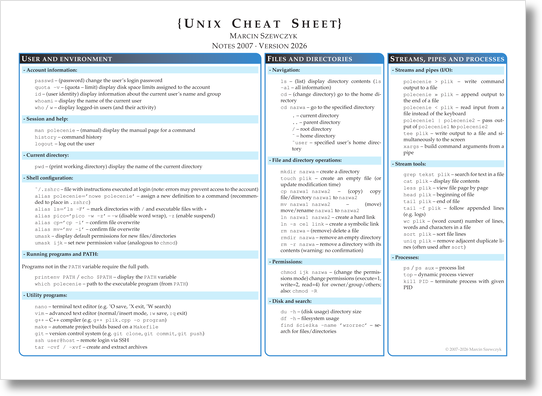 Fig. 1. Unix commands cheat sheet.
Example
One of the key ideas in Unix is the use of data streams and their combination via pipes.
Consider one of the most basic shell commands (implemented by the ls program):
1
ls
It displays the contents of the current directory. Most Unix commands accept options that modify their behavior.
Examples:
1
2
3
ls -a
ls -l
ls -al
-a— show hidden files\-l— long format (permissions, owner, size, date)\-al = -a -l(combined short options)
Information about available options can be obtained via:
1
2
ls --help
man ls
Working with Streams
1. Counting files
1
ls *.c | wc -l
ls *.c– list files with the.cextension\|– pass the output stream to the next program\wc -l– count lines
The result is the number of files matching the pattern.
2. Searching and sorting
1
grep error log.txt | sort | uniq
grep error log.txt— select lines containing “error”\sort— order the results\uniq— remove duplicate adjacent lines
3. Text analysis
1
cat tekst.txt | tr ' ' '\n' | sort | uniq -c | sort -nr | head
Processing steps:
- replace spaces with newline characters\
- sort\
- count occurrences (
uniq -c)\ - sort numerically in reverse order (
-nr)\ - display the first results (
head)
This is an example of chaining small tools to perform a more complex operation.
4. Log filtering
1
cat log.txt | grep error | sort | uniq -c
Search for errors in a log file, sort them, and count occurrences.
5. Output redirection
1
grep main *.c > results.txt
Standard output is redirected to a text file.
Errors can be redirected separately:
1
grep main *.c 2> errors.txt
6. Running in the background
1
sleep 60 &
The program runs in the background while the shell remains available for further commands.
Summary
Unix separates the kernel from user space, where a powerful shell and many small, specialized tools operate and can be combined into larger workflows.
Knowledge of Unix commands and the ability to connect them using pipes significantly increases efficiency and flexibility when working in the system.
References
M. D. McIlroy, E. N. Pinson, and B. A. Tague, “UNIX Time-Sharing System,” The Bell System Technical Journal, vol. 57, no. 6, pp. 1899–1904, 1978. (local PDF) ↩︎